

Last time, I told you about the first two weeks of my new ad run.
Week 1: Zero leads from four ads at $5 a day.
Week 2: Eight leads from two ads at $10 a day.
The fix was swapping Linktree for Facebook Lead Forms. The lesson was to keep people on the platform and remove the trust barrier. That simple change turned 0 leads into 8.
But I wasn’t done breaking stuff.
Week 3: I tried something smart and broke everything.
After Week 2, I was just so happy to be getting leads that I hadn’t yet thought “what’s my process for converting new leads into customers?”
I had a working system and leads. But no customers.
So going into week 3, I decided to make 2 changes:
Change #1 - I had an idea. What if I offered a free 1-on-1 call at the end of the lead form instead of a PDF? That feels more personal, and I figured I’d have an easier time selling someone my book by speaking to them than sending emails.
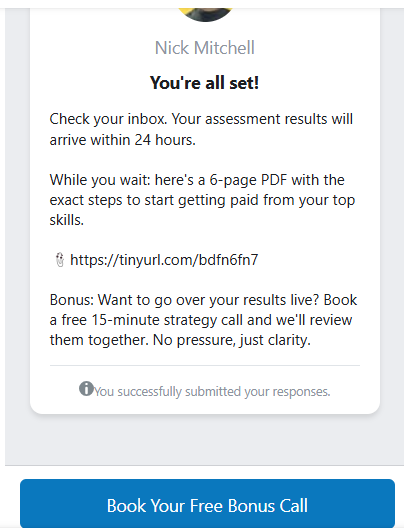
So I changed the final page of my lead form. Instead of showing a “thank you” page with a PDF download button, I redirected people to a Calendly link. They would book a free strategy call with me directly.
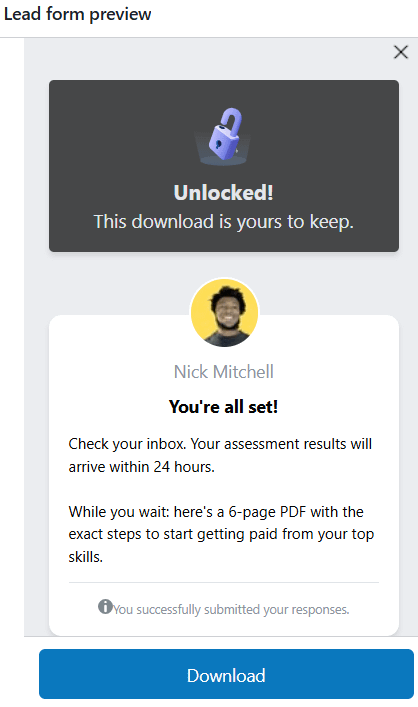
Original “thank you” page:
New “thank you” page:
Change #2 - I had heard online that people sign up for stuff more when it’s available
in a limited supply(”there are only 10 left” for example)
or for a limited time(”this deal will be gone in 3 days” for example).
Also, my video ad called “JOB SECURITY DOESN’T EXIST” had clearly outperformed the other videos I used in the first 2 weeks.
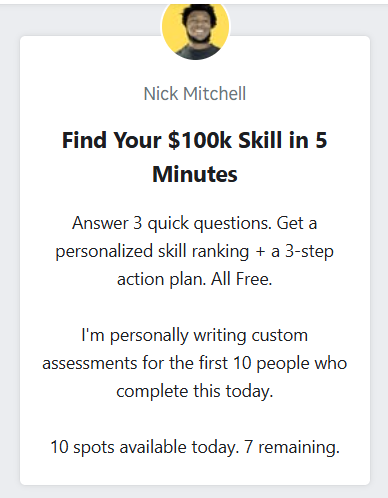
So for week 3, I decided to run that same video ad twice, but with different lead forms for each. On the first video ad, the lead form had the same wording as it did in week 2.
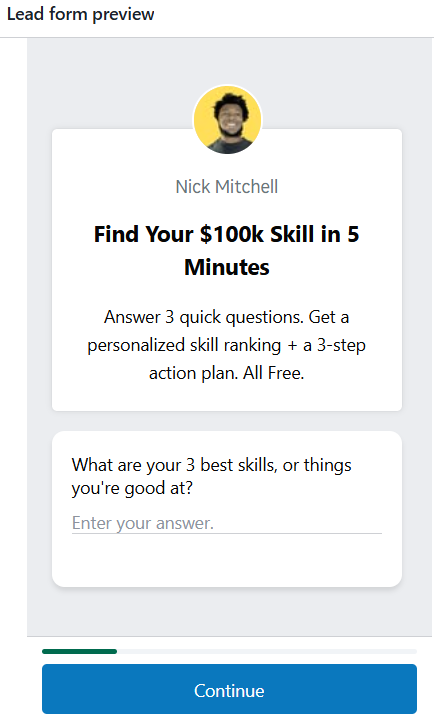
And the 2nd lead form was worded to tell people I had a limited supply of skill assessments(which was true because I have limited time in a day to finish each assessment).
I was proud of this. The changes felt like a real upgrade.
That said, I ran the ads for 3 days and got a whopping… zero leads. I spent about $66 during that time and not a single person completed the form.
I checked everything. The ads were running. People were clicking. But nobody finished.
The reason - after doing some research, I found out that Facebook’s lead forms don’t track external redirects as completions. When someone clicks that final “submit” button and gets sent to Calendly, Facebook counts it as a drop-off. They have no idea the person actually booked a call.
So my “upgrade” was actually a broken funnel.
Knowing this, I switched the form back to the PDF download on Thursday morning. Within a day, leads started coming in again.
Total spend for the fixed part of the week: $100.26. Total leads: 5.
The no-urgency version got 4 leads at $12.31 each. The urgency version got 1 lead at $51.03.

The lesson: Don’t redirect lead form completions to a third party booking page. Keep the final step simple. Give them the PDF.
Don’t miss our July offer. Unlock everything on our site for 40%, and get a free bonus when you do⬇️
Week 4: I tested a new video and added real urgency.
With the form fixed, I needed a fresh test.
The “JOB SECURITY DOESN’T EXIST” video was working. But I had another one called “3 Steps To Know What Skill You’re Good At” that performed well for me last year. So I swapped the videos.
Next, since the urgency-worded ad in week 3 got so few leads(1 lead for $50) and leads weren’t being captured in the first half of the week, I wanted to retest the urgency vs. non-urgency lead forms.
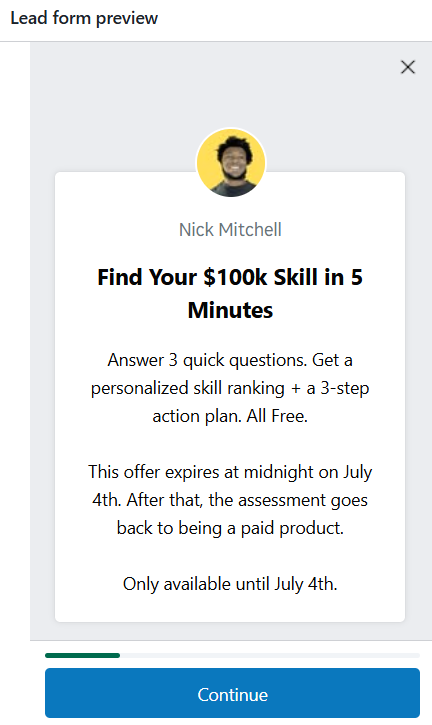
Finally, the 4th of July was coming up. So I changed the urgency-worded lead form to say…
Altogether, here’s what I tried for week 4:
I ran 2 video ads again(both using the “3 Steps To Know What Skill You’re Good At” video)
I ran the 1st video ad with the non-urgency version of the lead form
I ran the 2nd video ad with an urgency-worded version of the lead form based on the 4th of July.
I ran both ads at $10/day
After the first day of running the week 4 ads, the urgency ad had 3 leads at about $7 each. The no-urgency ad had 1 lead for about $27.
Seeing such a big difference in cost per lead, I paused the no-urgency ad and moved its budget to the urgency version.
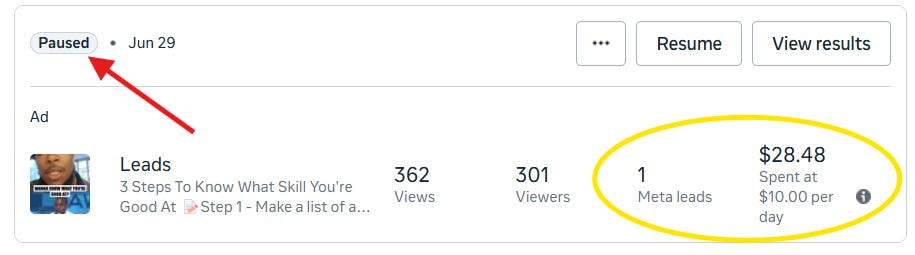
This meant that after day 1, the urgency version of the ad ran at $20/day instead of the original $10/day.
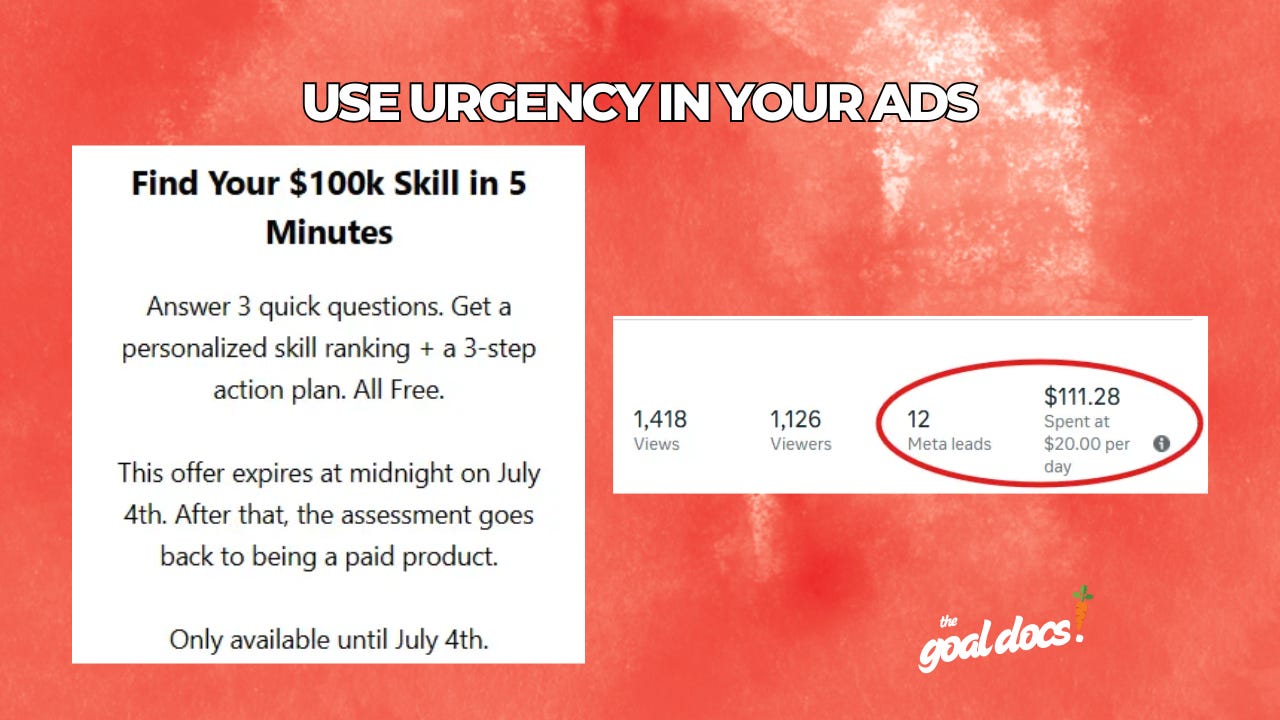
By the afternoon on July 5th, the urgency ad had 12 leads at $9.25 each. That is my best performance yet.'

The lesson: So far, urgency based on a deadline(like an upcoming holiday) performs better than urgency based on a limited supply(I only have time or room for x submissions).
Week 4 Bonus: Still No Customers
I was extremely excited about my success with gaining new leads in weeks 2 and 3. But even with the new leads, I still had no answer to the question “what’s my process for converting new leads into customers?”
So in week 4, I tried building a system to turn the leads into buyers.
Step 1: The Immediate Follow-Up
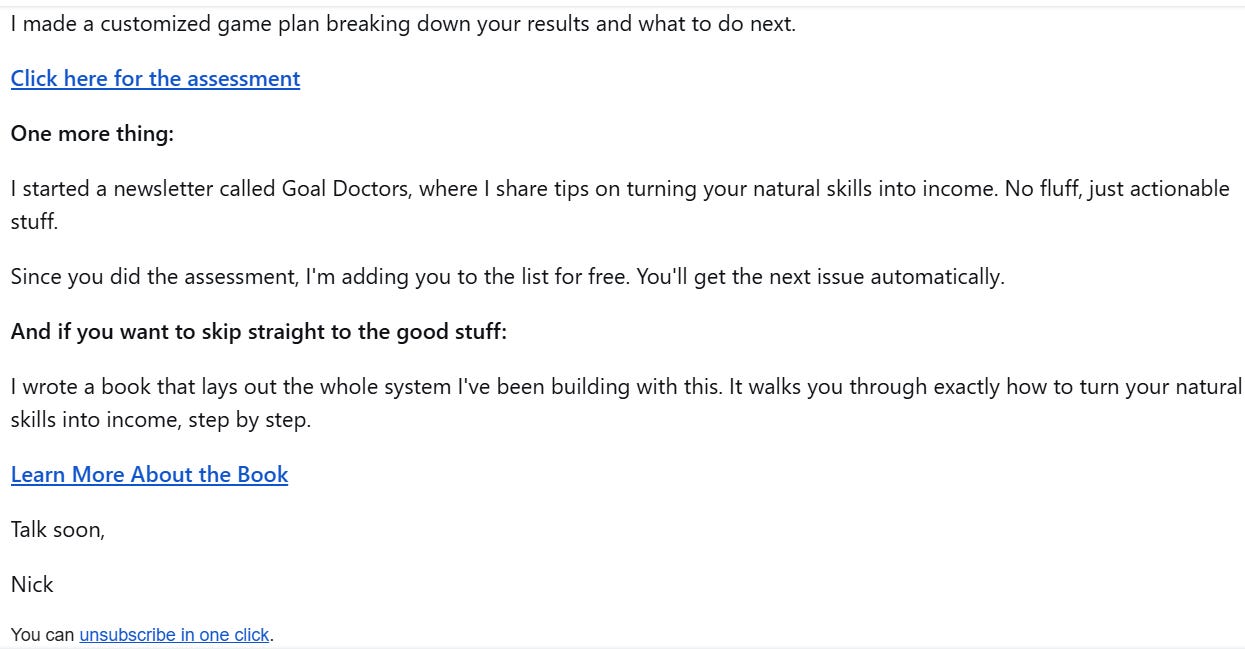
The same day someone fills out the lead form, they get a personalized email breaking down their skill assessment. That email tells them exactly what their top skills are and which one gives them the most energy.

Step 2: Add Them to the Newsletter
Everyone who gives me their email gets added to my Substack newsletter, Goal Doctors. I send that out bi-weekly. It’s full of actionable tips on turning skills into income and other useful stuff for solopreneurs and small business owners.
Step 3: The 7 Day Email Sequence
After the initial follow-up email, I start a 7-day sequence. Each email walks through a different part of starting a business. By the last day of the sequence, people will have a functional small business based on their skill.
And in every single email, there is a link or button encouraging people to either:
Get the book ($4.99)
Get a paid subscription ($20/month or $200/year)
After 1 week of testing the email sequence, it got zero sales. So my next goal is to improve the newsletter and email sequence to convert interested people into customers.
Week 4 Bonus: The Pricing Lesson
By the end of week 4, I had a clear picture of my numbers.
I was spending about $140 a week on ads and getting around 10 leads per week.
Those numbers gave me a clear target.
If I could get just 1 out of every 10 new leads to buy something that nets me $140, I would break even on my ad spend for the week. Anything beyond that is profit.
So I built a value ladder based on that math.
1. Free Lead Magnet – This is the free skill assessment and PDF that people sign up for through the ads I’ve been running.
2. $4.99 Book – After someone signs up, I’ve made sure to offer them my book on goal setting. At that point, someone has already gotten value from the free assessment. So they may trust me enough to spend five bucks.
3. $20/month Substack Subscription – The main thing I’m selling people is a paid subscription to my Substack/newsletter called goaldoctors.com. Monthly subscriptions add up over time. If someone keeps their subscription for a year, that’s $240. But I wanted a better deal for people who commit longer.
4. $200/year Substack Subscription – In addition to the monthly plan for my paid Substack, I set up a yearly option for $200 because it covers almost a week and a half of my ad spend. Also, yearly subscribers save $40 opposed to paying month to month.
5. $700/hour 1-on-1 Coaching – This is the “high ticket” offer. I set it at $700 because that is five times my weekly ad spend. One coaching call covers five full weeks of ads. If I book one of these a month, I can keep the ads running without losing money while I help someone directly.
The results from weeks 1 to 3 gave me the stats I needed to set pricing. Now, I just need to make the follow-up sequence work.
Conclusion - Here’s What I Learned in Weeks 3 and 4
The system kept improving. But only when I tested the right things.
What didn’t work:
· Redirecting lead forms to Calendly. It kills the tracking and kills the leads.
· Generic urgency. “Only 10 spots available” did not perform as well as a real deadline.
What DID work:
· A simple PDF download as the final step(clean and trackable).
· Real urgency tied to a real date. People respond to deadlines they already know about.
· Testing a new video against the old winner. Do not assume the first winner is the final winner.
The Numbers So Far
Week Leads Spend Cost Per Lead
• Week 1 - 0 leads, $142.86 spent
• Week 2 - 8 leads, $120.09 spent, $15.01 per lead
• Week 3 - 5 leads, $166.54 spent, $33.31 per lead(this was with the broken lead form going to Calendly).
• Week 4 - 12 leads, $111.02 spent, $9.25 per lead
We went from zero leads to 12 leads at $9.25 each in less than a month. It’s a working system.
Don’t miss our July offer. Unlock everything on our site for 40%, and get a free bonus when you do⬇️